
Never lose another session to bad memory
TTRPG Transcription for Live & Uploaded Sessions
Realms of Shod turns every tabletop session into a speaker-attributed transcript, captured with our live multiplayer tools, straight from Discord, or uploaded after the fact. Each session is broken into scenes, and the characters, places, and things of your realm are linked and updated in a living compendium. Whatever happened at the table, from the throwaway joke to the plan the party actually stuck to, is there when you go looking for it.
Live TTRPG Transcription vs. Uploading a Recording
Both paths run through the exact same pipeline (speaker attribution, scene breaks, entity linking, and search); the only difference is when the words get captured. Neither one is the "right" way to run a session; pick whichever fits how your table actually plays, and switch between them freely from one week to the next.
How it starts
Live Transcription
Join the videocast then hit record in any realm, or run /start in Discord to invite the bot to your voice channel.
Upload a Recording
Record the session on any device (a phone, a laptop, whatever is already in the room) with no setup beforehand.
When it processes
Live Transcription
Lines appear in Transcripts as they are spoken, with the rest of the party watching the session build in real time.
Upload a Recording
Processed after you upload it, adding the session to your archive as if it had been captured live.
Speaker attribution
Live Transcription
Attributed to the speaker as the session runs, so you can follow the conversation without waiting.
Upload a Recording
Speaker diaraization separates and labels different speakers in the recording.
Scene breaks and entities
Live Transcription
Generated as the session unfolds, so the Compendium fills in alongside the story.
Upload a Recording
Generated in the same pass as transcription, once the upload finishes.
Setup required
Live Transcription
A linked Discord account and someone in the realm with coins to /start the recording.
Upload a Recording
None beyond a having the audio file. Upload whenever is convenient.
Best for
Live Transcription
Groups already playing over Discord or looking for a live TTRPG experience inside a realm.
Upload a Recording
In-person tables with many players, or any session you'd rather not wire up live.
| Live Transcription | Upload a Recording | |
|---|---|---|
| How it starts | Join the videocast then hit record in any realm, or run /start in Discord to invite the bot to your voice channel. | Record the session on any device (a phone, a laptop, whatever is already in the room) with no setup beforehand. |
| When it processes | Lines appear in Transcripts as they are spoken, with the rest of the party watching the session build in real time. | Processed after you upload it, adding the session to your archive as if it had been captured live. |
| Speaker attribution | Attributed to the speaker as the session runs, so you can follow the conversation without waiting. | Speaker diaraization separates and labels different speakers in the recording. |
| Scene breaks and entities | Generated as the session unfolds, so the Compendium fills in alongside the story. | Generated in the same pass as transcription, once the upload finishes. |
| Setup required | A linked Discord account and someone in the realm with coins to /start the recording. | None beyond a having the audio file. Upload whenever is convenient. |
| Best for | Groups already playing over Discord or looking for a live TTRPG experience inside a realm. | In-person tables with many players, or any session you'd rather not wire up live. |
Most groups end up using both: live for the campaign they run every week, upload for the one-shot at a friend's place where dragging a laptop into voice chat isn't worth the hassle.
Your Tabletop RPG Transcript, Perfected
A transcript is only useful if you can actually find something in it later. Every session captured through Realms of Shod comes with the same five things built in, whether it was recorded live or uploaded afterward, so the archive from week one still holds up the same way by week fifty.
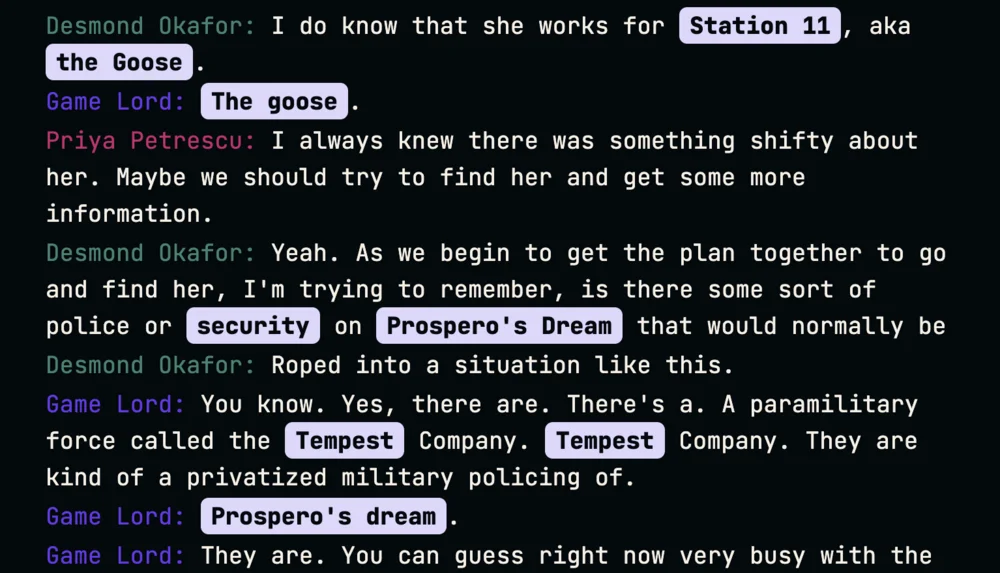
Speaker attribution
Every line is attributed to the person who said it, color-coded so you can scan who said what without rereading the whole scene. During a live session, lines appear in Transcripts as they are captured, attributed to the speaker the moment the platform can identify them: no manual tagging, no guessing who was talking when you go back to check a rules dispute three sessions later. Uploaded recordings get the same treatment once processed, so it doesn't matter which path you used to capture the session.
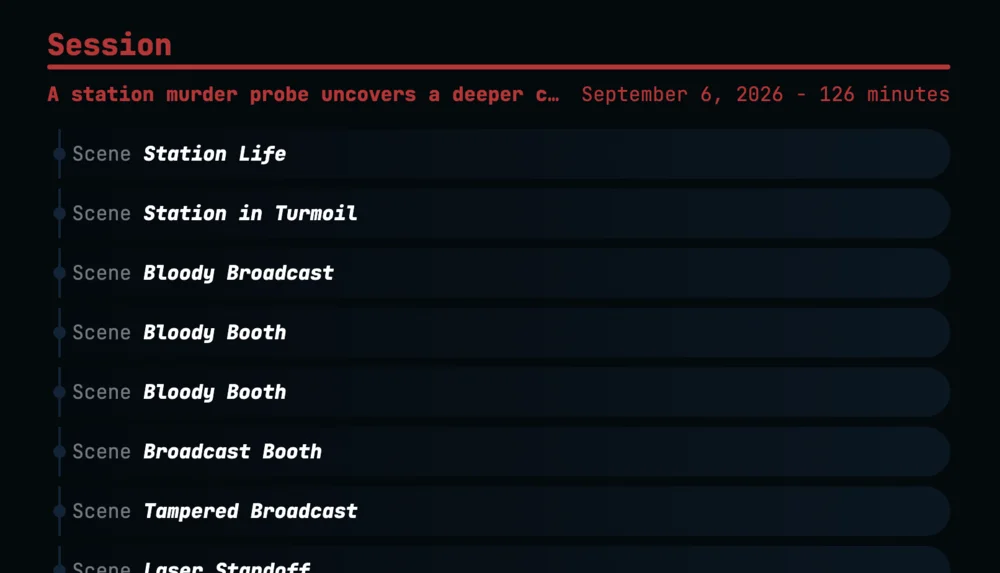
Automatic scene breaks
The transcript segments itself into scenes as the narrative shifts, generated automatically from the shape of the session rather than a manual chapter marker you'd have to remember to set. Session and scene selectors sit at the top of Transcripts: pick a session to load its scenes, pick a scene to jump straight to that stretch of the story, without scrubbing through an hour of audio to find the moment the negotiation actually happened.
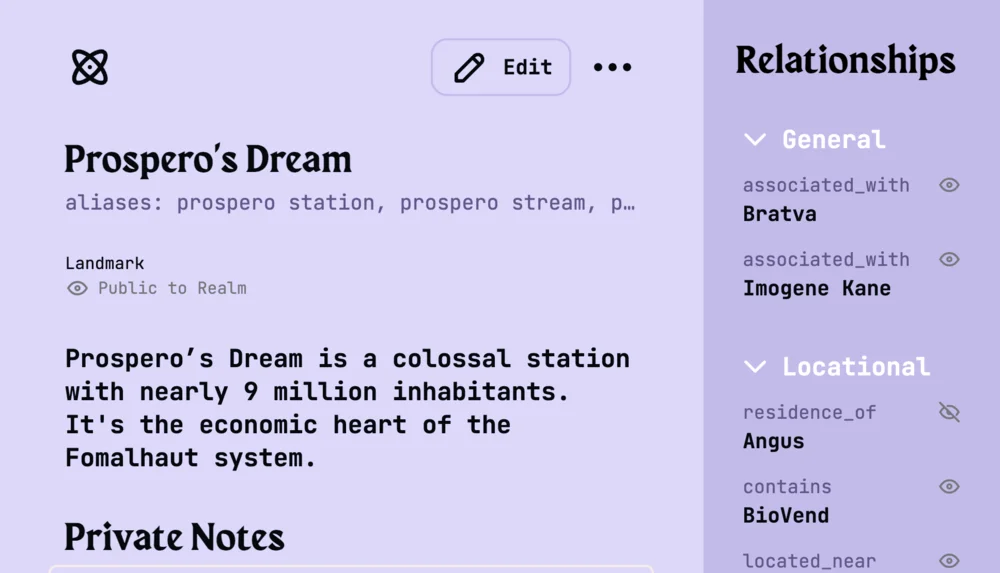
Entity linking into the Compendium
Names spoken in the session link automatically to Compendium entries like characters, locations, organizations, items, events, and establishments. Click a linked name in a transcript line to open its detail panel. If the same entity ends up created multiple times, merging consolidates the variants, relationships, and every reference across the realm. Extraction becomes smarter as it learns the different aliases and spellings of your entities.
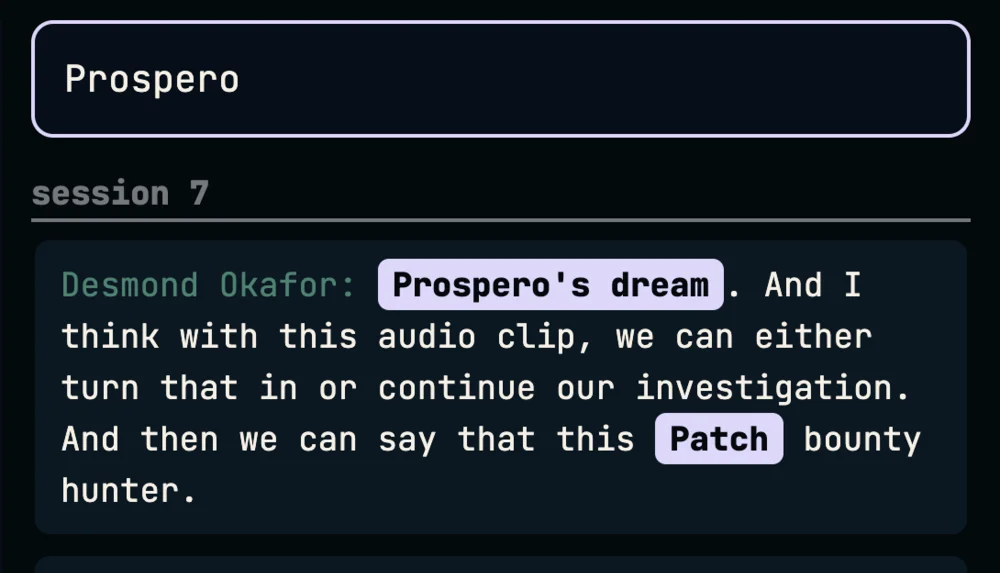
Transcript search
Search across every transcript in the realm from the panel on the right side of the screen. Results show the matching line and its session context, and clicking one jumps straight to that point in the transcript. Press Cmd+F (or Ctrl+F on Windows) to jump into search from anywhere in the Transcripts view: no digging through session after session by hand to remember which week someone made a promise they later broke.
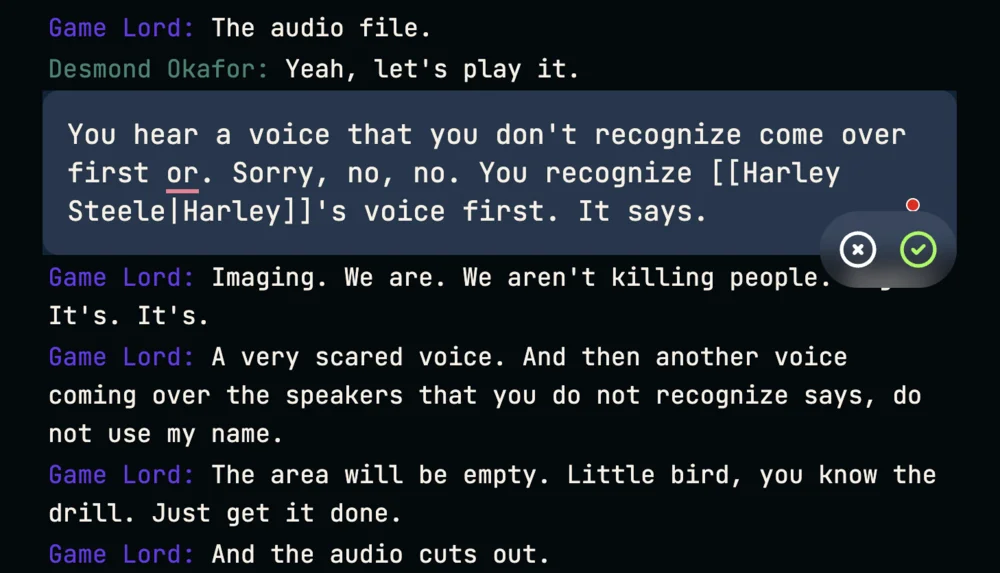
Transcript editing and alias correction
Speakers can edit their own lines; realm admins and owners can edit any line, for the sessions where someone garbles a sentence or a name comes out wrong. When an edit changes an alias, the platform detects it and offers to apply the correction across every matching instance in the realm: fix a misheard fantasy name once, not scene by scene. Lines can be deleted the same way, by the same speaker-or-admin rule, so a stray off-mic comment doesn't have to live in the archive forever.
AI Transcription for Your TTRPG, Straight From Discord
Talk and play where your group already does. Add the Realms of Shod bot to your server from Discord's app directory or the H.U.B., then link your account in three steps. After that, every session run through the bot is captured, attributed, and archived automatically, with nothing extra to remember once the setup is done.
Run /link
In any channel where the bot is present, type /link and send the command. No dashboard to find, no separate app to install first.
Authenticate
The bot replies with a unique link. Open it in your browser and sign in to your Realms of Shod account (or create one) to complete the connection.
Confirmed
The bot confirms your account is linked, and you can run /start to join the voice channel and begin transcribing right there. /pause and /resume handle breaks or off-the-record chatter, /stop ends and saves the session, and /coins checks your balance without leaving Discord.
Only the person starting the session needs a linked account. Other players can jump into voice chat as themselves, and if they later link too, past transcriptions get associated with their account automatically.
Your table, your recording, your call
Recording is off by default and opt-in. No ads, no tracking, no data selling.
You can delete stored audio yourself at any point. Deleting a transcript deletes the audio file. Delete a session, all transcripts and audio files within are deleted. Nothing gets processed without someone at the table choosing to hit record, and stored user data stays limited to what running the platform actually requires: your name, email, timezone, and the realms and sessions you're linked to.
What it costs, in plain terms
Transcription runs on coins, roughly 130 coins per hour of recorded audio, while chat, dice, and the Compendium stay free forever. Any player at the table with a balance can cover a session, the cost splits automatically across everyone who has coins, and recording just stops instead of running up a surprise bill if the balance runs dry.
Frequently Asked Questions
Your next session deserves a transcript
Sessions played live, uploaded afterwards, or both: start capturing your table's story today. Signing up costs nothing, comes with a coin bonus to try it out, and takes less time than setting up the table.
Join us and connect for poems, content, updates, direct questions, community discussion, and more.
© 2026 Realms of Shod. All rights reserved.