
World Building
Entities
Entities are the named things that matter in your world: characters, places, factions, artifacts, events. They are the memory of your realm.
Every session produces a flood of names. Without a structure to catch them, continuity erodes. Entities solve this by giving every named thing in your world a permanent record: a description, a history, and a web of connections to everything else.
Persistent memory
Once an entity exists, it persists across sessions. Characters remember allegiances. Places accumulate history. The world does not reset.
Inline presence in text
Entities are linked directly inside transcripts and messages, so any mention of a name becomes a navigable reference to that entity.
A living graph
Relationships between entities form a graph that grows and changes as sessions unfold. Who rules whom, who betrayed whom, what was found where.
Every entity has a type that describes what kind of thing it is. Types are organized into seven categories.
Character
| Type | Description |
|---|---|
| character | A named person or NPC in the world. |
| creature | A monster, beast, or non-humanoid being. |
| species | A category of life sharing common traits. |
| race | A humanoid people with a distinct culture or lineage. |
Location
| Type | Description |
|---|---|
| city / town / village | Populated settlements of varying size. |
| settlement | A general inhabited place. |
| region / territory | A broad geographic or political area. |
| landmark | A notable fixed point in the world. |
| natural_feature | A river, mountain, forest, or other natural formation. |
| ruin | A decayed or destroyed structure with history. |
Organization
| Type | Description |
|---|---|
| faction / guild | A group organized around a shared purpose or trade. |
| political_body | A governing council, senate, or ruling assembly. |
| cult / religion | A group united by belief or devotion. |
| army / military | A fighting force or martial institution. |
| clan / dynasty | A family line or bloodline of significance. |
| merchant / business | A commercial enterprise or trading house. |
| sanctuary / residence | A protected haven or household. |
Establishment
| Type | Description |
|---|---|
| shop / marketplace | A place of commerce. |
| temple | A site of worship or religious practice. |
| archive / academy | A center of knowledge or learning. |
| treasury / political_center | A seat of financial or governmental power. |
| healing_center | A place for rest, recovery, or medicine. |
Item
| Type | Description |
|---|---|
| weapon | An instrument of combat. |
| artifact / relic | An object of ancient or magical significance. |
| heirloom | An item passed down through generations. |
| magic | A spell, enchantment, or magical effect. |
| tool / consumable / item | Practical or mundane objects. |
Event
| Type | Description |
|---|---|
| battle | An armed conflict between forces. |
| disaster / upheaval | A catastrophic or world-changing event. |
| festival | A celebration or communal gathering. |
| meeting / treaty | A negotiation, agreement, or formal encounter. |
| event | A general occurrence of narrative significance. |
Misc
| Type | Description |
|---|---|
| vehicle | A ship, carriage, or other mode of transport. |
| map / document / letter | A written or illustrated record. |
| currency / resource | A form of economic value or raw material. |
| law | A rule, decree, or binding agreement. |
| technology | An invention or system of knowledge. |
| unknown | An entity whose nature has not yet been determined. |
Everywhere entities appear in text, they are encoded as inline links. This is the bracket format that ties a name in a transcript or message to a specific entity record.
[[entityName|alias]]The entityName is the canonical name of the entity as it exists in the compendium. The alias is the text that actually renders in the UI. The two can differ: if a speaker says Gharri but the entity is named Gherri, the link displays the spoken form while still resolving to the correct record.
Clicking an inline link opens the entity panel. Links appear in live transcripts, uploaded audio transcriptions, and messages. They are placed automatically during sessions and can also be inserted manually.
A variant is an alternate name for an entity: a nickname, an alias, or a shortened form. Variants are how the platform recognizes the same entity across different spellings and phrasings in your sessions.
Matching
Variants are used to match names in transcripts and messages to entity records. Longer names take priority, so "Thornwall Keep" will match before "Thornwall" if both exist.
Corrections
If a speaker consistently mispronounces a name, the spoken form can be stored as a variant that resolves to the correct entity and displays the proper spelling.
Blocked names
Common words cannot become variants. Articles, conjunctions, and TTRPG mechanics like "roll" or "attack" are excluded to prevent false matches.
As your session is transcribed, the platform reads the text and automatically identifies named entities. New ones are created. Existing ones are recognized by their variants. Relationships between them are inferred and recorded. Mentions in the transcript are linked inline.
This happens continuously in the background. By the time a session ends, your compendium has already been updated.
Creating new entities and relationships is the work of the Entity Extraction gardener, which realm Owners and Admins can turn off per realm. Mentions of entities you already have are linked either way.
A relationship connects two entities with a typed edge: Aldric serves the Iron Throne, the Iron Throne governs the Northern Reach. Relationships are directional (they have a source and a target), but the UI shows both directions so you never need to look up the inverse manually.
Organizational
| Type | Description |
|---|---|
| member_of | This entity belongs to a group or organization. |
| affiliated_with | A looser association without full membership. |
| parent_of | This entity is the progenitor or parent organization of another. |
| governs | This entity holds authority over another. |
| regulated_by | This entity is subject to oversight by another. |
Locational
| Type | Description |
|---|---|
| resides_in | This entity lives or is based in a location. |
| exists_within | This entity is contained inside another. |
| found_in | This entity can be encountered in a location. |
| operates_within | This entity conducts activity in a location. |
| adjacent_to / located_near | This entity is geographically close to another. |
| travels_to | This entity moves toward or visits a location. |
Social
| Type | Description |
|---|---|
| ally_of | A cooperative relationship between entities. |
| enemy_of | A hostile or adversarial relationship. |
| competes_with | A rivalry without open conflict. |
| trades_with | A commercial or exchange relationship. |
| influences | This entity shapes the behavior or state of another. |
| seeks | This entity is pursuing another entity. |
Employment
| Type | Description |
|---|---|
| employs | This entity has hired or commands another. |
| serves | This entity works for or is loyal to another. |
| leads | This entity is the head or commander of another. |
| commands | This entity directs the actions of another. |
Ownership
| Type | Description |
|---|---|
| owns | Legal or recognized possession. |
| possesses | Physical or current holding of an item. |
| has | A general attribute or belonging. |
Commerce
| Type | Description |
|---|---|
| creates | This entity produces or crafts another. |
| accepts | This entity receives a form of payment or currency. |
| purchases | This entity buys from another. |
associated_with is a general-purpose fallback for connections that do not fit a more specific type.
Individually, relationships describe one connection. Together, they form a graph: a web of every named thing in your world and how each relates to everything else. This graph accumulates across sessions without reset.
It evolves with play
Every session can add new relationships. An NPC who was a stranger in session one may be a sworn enemy by session five. The graph holds the current state, and each entity's History records every relationship added, changed, or removed along the way, so a relationship deleted by mistake can be restored.
Relationships have access control
Each relationship is independently visible or hidden per player. A secret alliance between two factions can exist in the graph without being exposed to everyone at the table.
No two identical edges
A given relationship type between any two entities can only exist once. This prevents duplicate edges from accumulating over repeated mentions of the same connection.
Clicking any entity link opens a panel with the full record for that entity. This is where description, notes, access, and relationships are all visible in one place.
Description and notes
The description is set by the extraction pipeline or written manually, and the Description Auto-Sync gardener can refresh it as scenes end. Every rewrite lands in History, where it can be rolled back. Notes are a personal scratchpad: every realm member gets their own private notes field on each entity, visible only to them, not even to the entity's creator or the realm's owner. These are distinct from Compendium notes, which are standalone documents that can be shared with players.
Relationships sidebar
All relationships for the entity are listed in the panel, grouped by category. Each entry shows the relationship type, the connected entity name and type, and an access indicator. Clicking a connected entity navigates directly to its panel.
Linking entities manually
From the panel, any Collaborator or above can add a relationship to any other entity in the realm by selecting the target entity and choosing a relationship type. This is how connections discovered outside of session text (through player knowledge, prep notes, or inference) get added to the graph.
Access control
Each entity and each relationship on it can be revealed or hidden per player independently. An entity visible to the whole table may still have relationships that are hidden from some players.
Mentions and History tabs
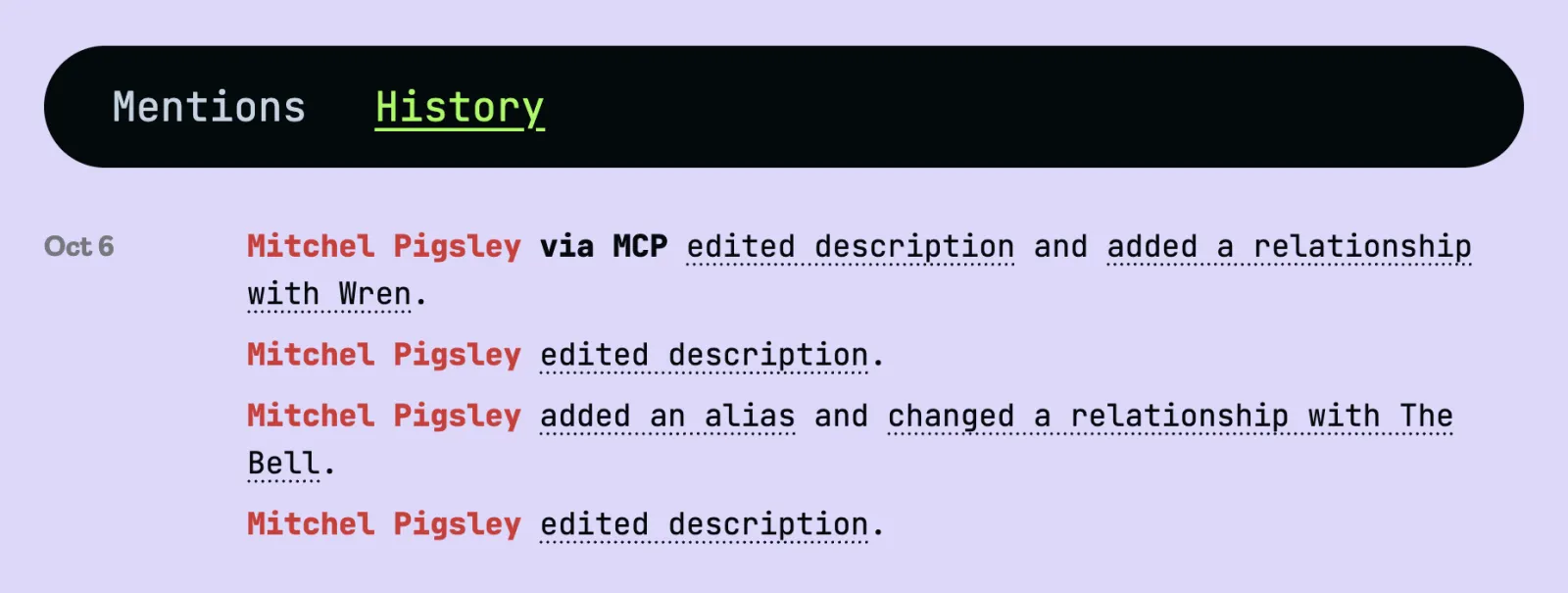
Below the description and notes, two tabs. Mentions lists where the entity comes up across your realm. History lists every change made to it, and is where you roll changes back.
Reveal notifications
When a session mentions an entity that some of the table can't see, session participants who can already see it and are allowed to reveal it get a notification. One click reveals it to everyone in that session, without opening the full panel. If that leaves every realm member able to see it, it becomes Public to Realm.
Every entity keeps a record of how it has changed. Open an entity and switch from Mentions to History to see it: a newest-first list of plain sentences, like “Mitchel Pigsley via MCP edited description and added a relationship with Wren.” History is not just a log. It is how you roll a change back.
What gets recorded
Creation, imports, merges, and changes to the name, type, description, aliases, and images, plus every relationship added, changed, or removed. A relationship change shows up on both entities it connects. Private notes and access changes are not recorded.
Who made each change
Each change names who made it: a realm member, the Gardener (entities and relationships found by Entity Extraction, and descriptions refreshed by Description Auto-Sync), a change made through the API or MCP (labelled "via API" or "via MCP"), or an Import. Changes made during a session link back to that session and scene.
Before and after
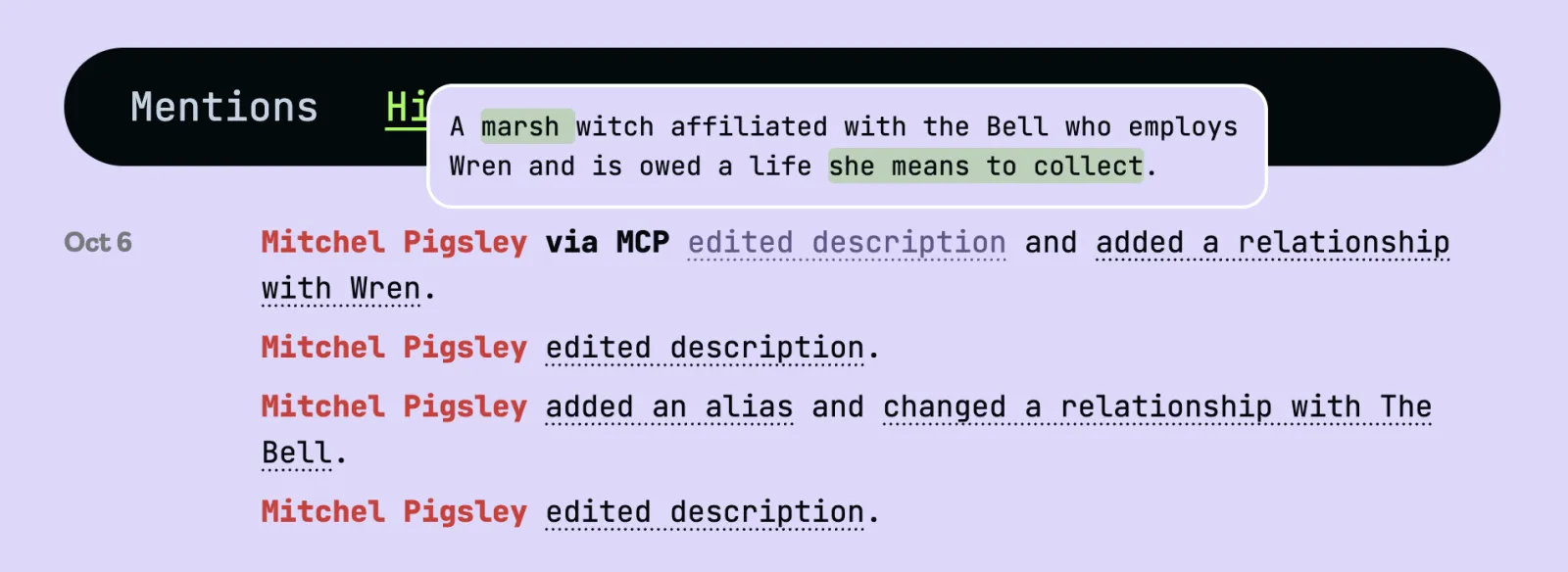
Underlined phrases open a popup showing what changed, with the old wording struck out and the new wording highlighted.
Who can see it
Anyone who can see an entity can see its History. The before-and-after wording and the Restore buttons are for Collaborator or above. Other members see who changed what and when, but not the earlier wording. If a relationship change involves an entity you cannot see, that entity's name is hidden.
Merged entities keep their past
When entities are merged, their history moves to the surviving entity, so nothing recorded about either one is lost.
In the app only
History cannot be read through the API or MCP, but changes made through them are recorded and labelled like any other.
When a description changes for the worse, or a relationship is deleted by mistake, you can put it back from History. This is the safety net for Description Auto-Sync: if the Gardener rewrites a description you liked, restore the version you had.
Restore a description
Open a description change in History and choose Restore previous version. The description goes back to the wording it had before that change.
Restore a relationship
Open a removed relationship in History and choose Restore relationship. It comes back with the same access it had before it was deleted.
Restores are recorded too
A restore is itself a change in History, so you can always see what happened and change your mind again. The Gardener will not immediately overwrite a restored description at the next scene.
Who can restore
Collaborator or above: the same roles that can edit entities and relationships.
What can be restored
Descriptions and deleted relationships. Name, type, alias, and image changes are shown in History but have to be changed back by hand, and a removed image cannot be recovered.
Over the course of a campaign, the same entity can accumulate multiple records: different spellings of the same name, an alias recognized as a separate character, a duplicate created before the original was in the system. Merging consolidates them into one.
One entity survives
You designate a surviving entity. All source entities are deleted after the merge.
Variants are transferred
Every variant from every source entity is moved to the surviving entity. Future text matching will resolve all of those names to the single record.
Relationships are migrated
All relationships from source entities are re-pointed to the surviving entity. Self-referential relationships that would result from the merge are discarded. Duplicate relationship types are deduplicated.
History carries over
Each source entity's History moves to the surviving entity, and the merge itself is recorded there.
Notes can be merged
If source entities have notes from the same user, those notes are joined with a separator under the surviving entity.
Access can be merged
The surviving entity can inherit the combined access list from all source entities, ensuring no player loses visibility they previously had.
Text references are updated
All bracket links in transcripts and messages that pointed to a source entity ID are rewritten to point to the surviving entity. The merge is reflected everywhere in the historical record, not just going forward.
Entities and relationships are fully accessible via the REST API and the MCP server.
Entity Graph API — list, get, create, update, merge, and delete entities and relationships with Bearer token authentication. Each entity also returns the IDs of quests linked to it; see the Quests API to read or manage those quests directly.
MCP tools — list_entities, get_entity, create_entity, edit_entity, edit_entity_notes, merge_entities, delete_entity, list_relationships, create_relationship, and delete_relationship are available to any connected AI assistant.
Changes made through either show up in each entity's History as “via API” or “via MCP”, and can be rolled back in the app like any other change. History itself is not available through the API or MCP.