
Getting Started
Using the H.U.B.
The Harmonic Unification Beacon (H.U.B.) is your home base. From here you can see all your realms, create new ones, join others, and manage your account settings.
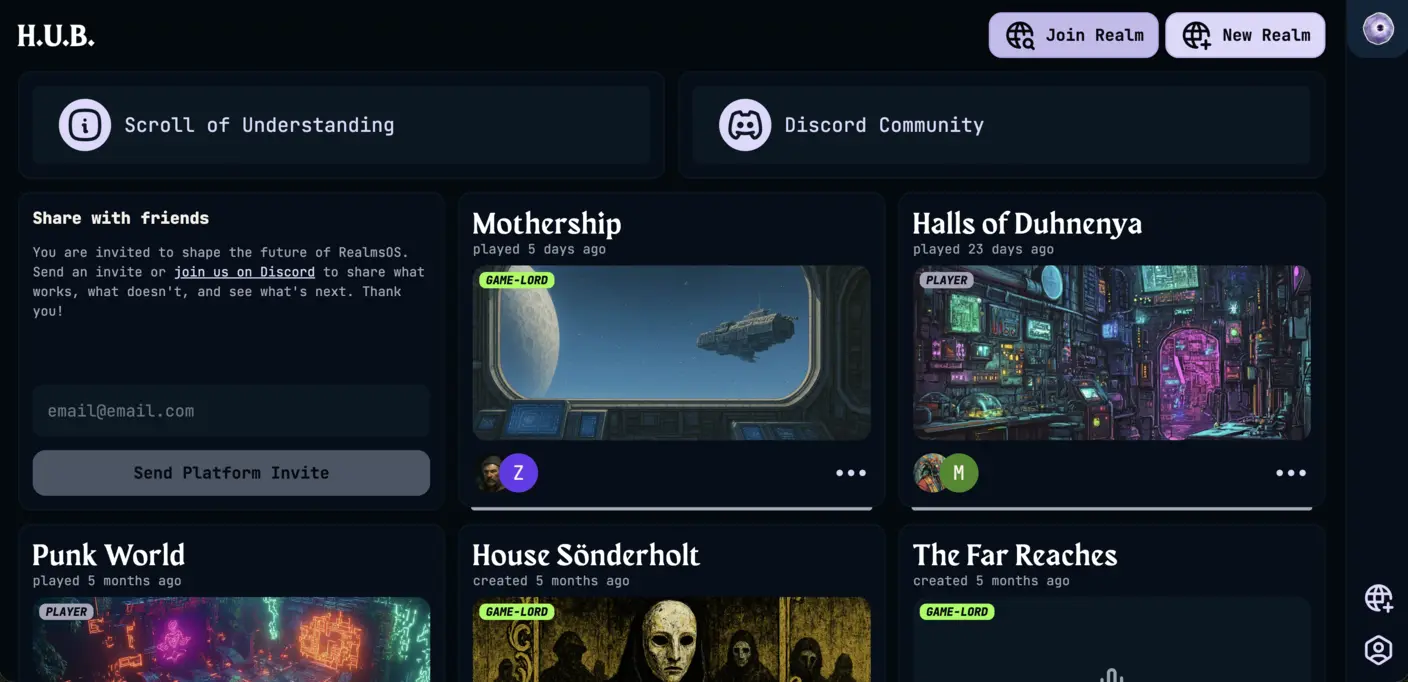
The main grid shows every realm you belong to. Each card displays the realm title, how long ago it was last played, your role, a cover image, and the avatars of all members. If any members are currently connected, a live active count appears on the card. Clicking a card takes you straight into that realm's Gamestream.
Member
Read-only. Can join live sessions but not create or edit content.
Collaborator
Can create and edit content, but cannot manage members or realm settings.
Admin
Can manage members and realm settings, in addition to creating and editing content.
Owner
Full control over the realm, including deleting it.
See Permissions for the full breakdown of what each role can do.
A sort dropdown above the grid controls the order of your realm cards. Recent is the default and orders realms by most recently active. Custom Order lets you drag and drop cards into whatever arrangement you like, so you can keep your favorite realms at the top.
Click New Realm in the top bar to open the realm creation form. Give your realm a title and optionally a cover image. Once created it will appear in your grid immediately.
Creating realms requires a Storyteller subscription. If you hit the limit on your current plan, you will be prompted to upgrade.
Click Join Realm in the top bar and enter the invite code shared by the realm's creator. Once accepted, the realm appears in your grid with the Member role.
The ··· menu on each card exposes additional actions.
Join Party
Navigate directly into the realm.
Delete Realm
Permanently deletes the realm and all of its data. Only available to the realm's creator.
Abandon Realm
Removes you from the realm. Available to everyone except the creator. The realm and its data remain intact for other members.
Open User Settings from the portal sidebar to manage your account.
Name
The display name shown to other members inside realms.
Timezone
Used to correctly display session times and timestamps throughout the platform.
Email preferences
Control whether you receive product update emails and realm notification emails.
Clear stored audio
When enabled, all audio files are automatically deleted after transcription completes. Audio cannot be recovered once cleared.
Discord
Link your Discord account and add the Realms of Shod bot to your server to enable real-time voice channel transcription.
Password
Set or update your account password.