
Record your D&D session on Discord, and read it while you play
Discord Bot for Live D&D Session Transcription
Type /start and the Realms of Shod bot joins your voice channel and transcribes the session live. Lines land in the realm's Transcripts as people speak, each one credited to whoever said it, so the party can scroll back to the riddle the sphinx asked five minutes ago without anyone having taken notes.
Most Discord recording bots hand you an audio file, or a transcript, once the call is over. This one works during the game: the transcript, the scene breaks, and the NPCs and places in your realm compendium all fill in while the session is still running.
Set Up the Discord Transcription Bot in Three Steps
Setup takes a couple of minutes, and only one person at the table has to do it.
/images/discord-bot/add-discord-bot.webp 1. Add the bot to your server
In the H.U.B., open User Settings and press Add Discord Bot, or install it from Discord's App Directory. Choose the server your group plays on and approve the permissions it asks for.
/images/discord-bot/discord-linked.webp 2. Link your account with /link
Type /link in a channel the bot can read. It answers with a link; open it, sign in to Realms of Shod, and your Discord account is connected. You only do this once.
/images/marketing-transcripts.webp 3. Sit in voice and type /start
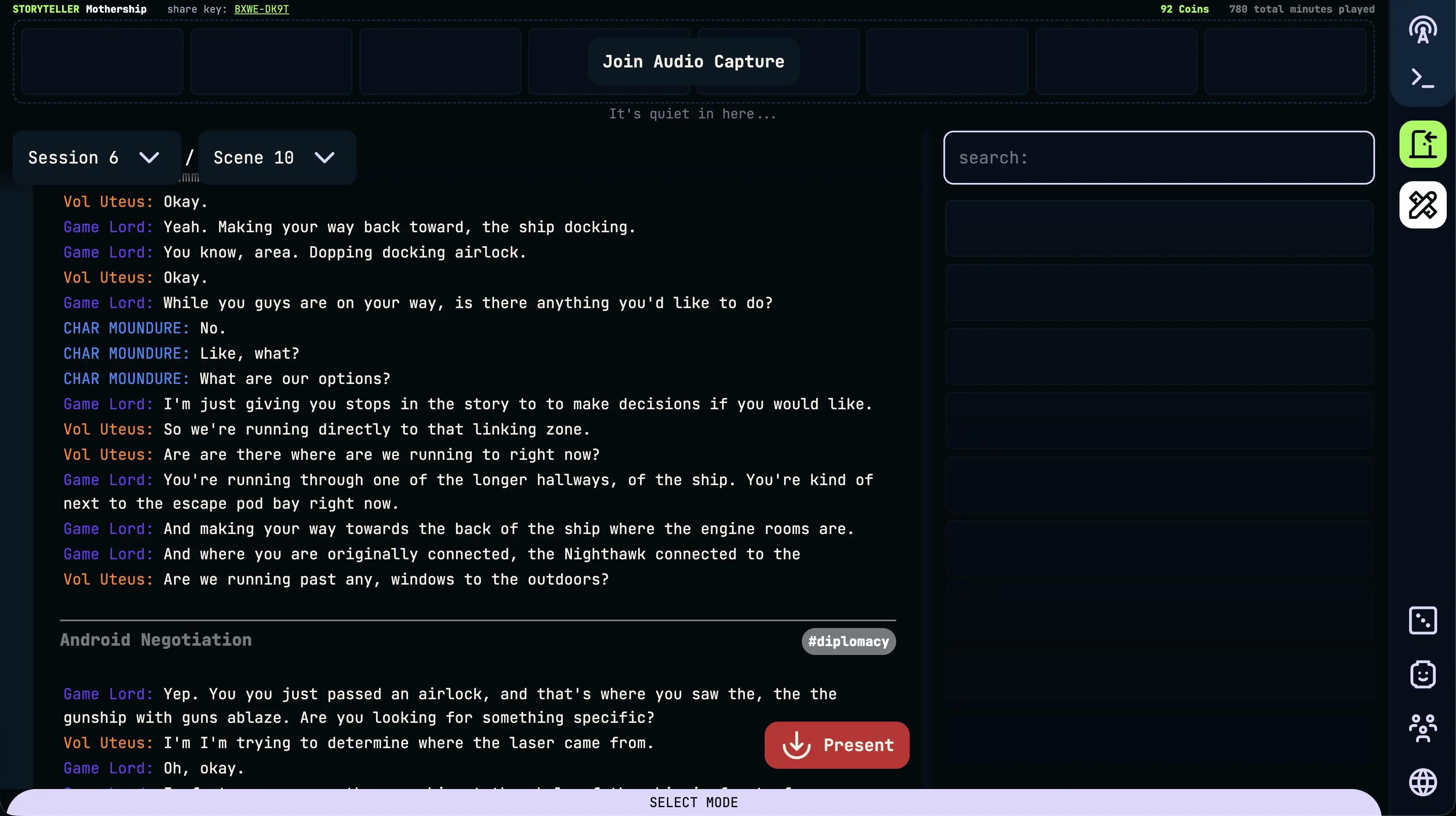
Join the voice channel with your party, type /start, and pick the realm the session belongs to. The bot joins the channel and the transcript starts filling in on the realm's Transcripts view.
Who Needs to Link Their Account
Only the person who types /start. Usually that is the DM, but it can be any player with a linked account, coins to spend, and permission to start sessions in the realm. Everyone else just joins the voice channel the way they always do; nobody is asked to sign up before they can play.
Discord keeps each person's microphone separate, so the bot knows who is talking even when nobody else has linked. A player who has linked is credited by their Realms of Shod account and character. A player who hasn't is recorded against their Discord identity, and the moment they link later on, every line they had already spoken in earlier sessions moves over to their account.
Live Transcription vs. Discord Recording Bots
Craig, DiscMeet, and Bardlog are all good at what they set out to do, and Bardlog in particular is built for D&D groups. The difference is timing: each of them hands over its transcript after the session, while Realms of Shod transcribes during it. The table reflects each product's own site as of September 2026.
| Realms of Shod | Craig | DiscMeet | Bardlog | |
|---|---|---|---|---|
| Live or after the session | Live. Lines show up in Transcripts while the session is still running. | After. Records audio; transcripts, for top-tier supporters, are made from the finished recording. | After. Transcript and summary are posted to a Discord thread shortly after the call ends. | After. Transcription starts once the session ends. |
| Speaker attribution | Every line is labelled with who said it. Once a player links their account, all their lines show under their name, even from sessions before they linked. | A separate audio track per speaker. | Per-speaker labels. | Each line labelled with the speaker. |
| Compendium linking | NPCs, places, and items are linked into the realm compendium during play. | None; it is a recording tool. | Campaign notes for GMs; no entity linking documented. | NPCs, locations, items, and factions extracted into a campaign wiki after each session. |
| Search | Search every transcript in the realm and jump to the exact line. | None built in. | Search across past calls. | Search by keyword or speaker. |
| Privacy | Off until someone starts it; deleting a transcript deletes its audio; no ads or data selling. | Recordings expire after 7 days, longer for supporters. | Transcripts encrypted, not shared, and deletable from the dashboard. | Original audio deleted after 14 days, with a compressed copy kept; whoever records is responsible for consent. |
If all you want is a clean multi-track recording to edit into a podcast, Craig is the better fit. If you want to follow the story while you play, that is what this bot is for.
Slash Commands at the Table
Six commands cover a whole session.
- /link: ties your Discord account to Realms of Shod; needed once, before anything else
- /start: brings the bot into your voice channel and opens a new session in the realm you choose
- /pause: stops transcribing for a bathroom break or an out-of-character tangent
- /resume: picks the transcript back up where it left off
- /stop: ends the session and saves it to the realm
- /coins: shows your coin balance from inside Discord
Discord Transcription Bot FAQ
Does every player need a Realms of Shod account?
No. Only the person who types /start needs a linked account. The rest of the party talks in voice as usual and is still told apart in the transcript, and anyone who links later is credited for what they said before.
Can I record a D&D session on Discord and read it afterwards?
Yes. When you type /stop the session is saved to your realm with its transcript, scene recaps, and session summary, and it stays there to read, search, and edit. The difference from a recording bot is that you can also read it while you're still playing.
What happens when we pause?
After /pause, nothing said in the voice channel is transcribed until someone types /resume. Use it for breaks, scheduling chat, or anything the table would rather keep out of the campaign record.
How much does the bot cost to run?
Adding the bot is free. Transcription uses coins, roughly 130 per hour of audio, and the cost is shared between the session's participants who have coins. /coins shows your balance without leaving Discord.
Does it work with other tabletop games on Discord?
Yes. Nothing about the bot is tied to Dungeons & Dragons; Pathfinder, Call of Cthulhu, a homebrew system, or a game with no dice at all are transcribed the same way.
Bring the bot to your next session
Make an account, add the bot, and type /start at the beginning of your next game. Want to know what the recaps look like once it's done? See real D&D session recaps.